Use the app first, then advertise aggressively
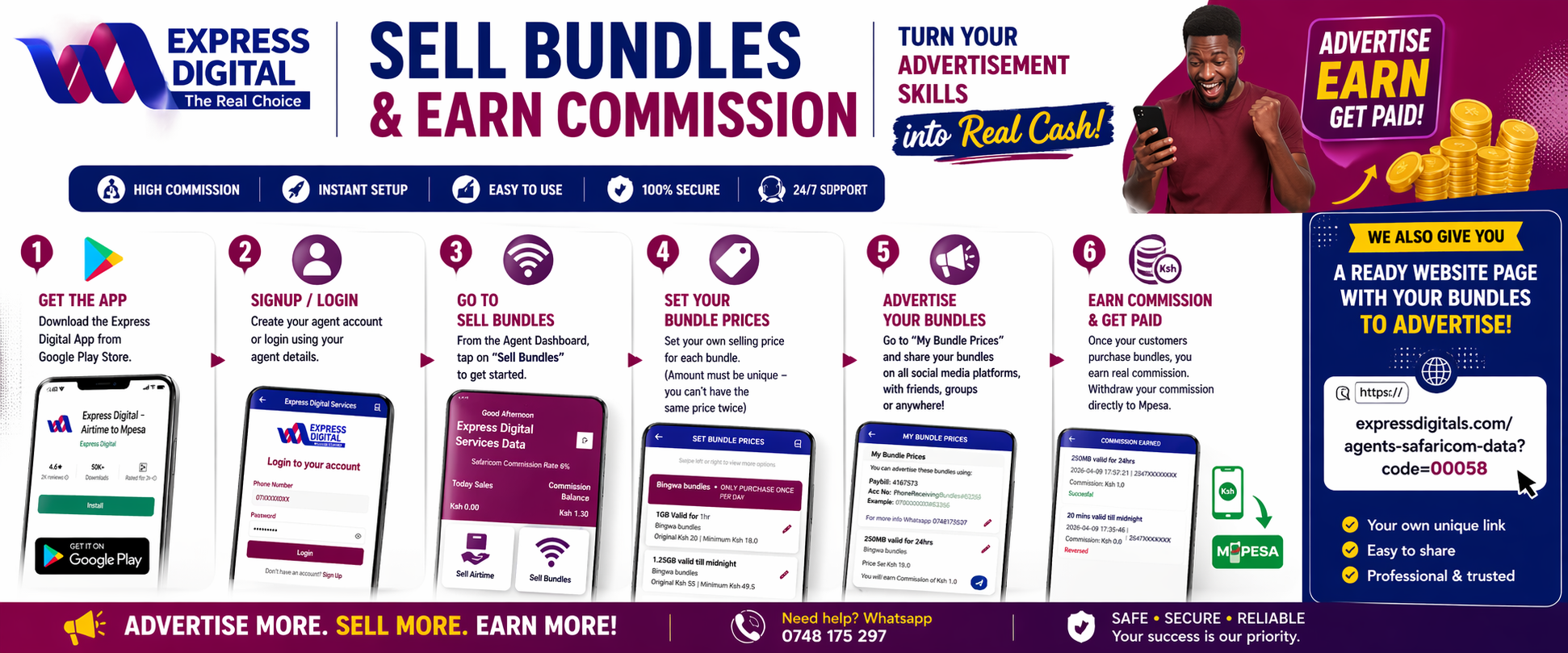
To sell bundles successfully, agents should first download the Express Digital app from Google Play, then sign up or login to the agent account. From the Agent Dashboard, open the Sell Bundles section, set the prices you want to advertise, and save them in the app.
After setting prices, go to My Bundle Prices. This section gives you the exact pricing details you can advertise on WhatsApp, Facebook, Instagram, TikTok, X, Telegram, status updates, groups, and directly to friends and customers.
Once a customer purchases using your advertised price, you earn commission which becomes visible in the app and can later be withdrawn to M-Pesa.
Step-by-Step Guide for Agents
Download Express Digital App
Go to Google Play Store and install the Express Digital app. This is the first and most important step because all bundle pricing and commission tracking happens inside the app.
Signup / Login to Agent Account
Open the app and sign up or login using your registered agent details. Once logged in, you will access the Agent Dashboard where the Sell Bundles option appears.
Open Sell Bundles Section
On the Agent Dashboard, tap Sell Bundles. This is where you manage bundle prices, view your saved bundle prices, and monitor commission earned.
Set Your Bundle Prices
Choose the bundles you want to advertise and set your prices. The price you set becomes the one your customers will use when buying through your promotions and personal bundle page.
Advertise Your Bundles
Go to My Bundle Prices and use the pricing information to advertise on all social media platforms and directly to friends, groups, customers, and communities.
Earn Commission Withdrawable to M-Pesa
Once customers purchase through your bundle prices, you earn commission. You can monitor the earnings in the app and later withdraw the commission to M-Pesa.
Important Reminder for Agents
- Always download and use the app first before advertising.
- Use the Sell Bundles section to manage everything.
- Use My Bundle Prices when advertising to customers.
- Your customers only need the paybill/account details you advertise.
- Track commission in the app after successful purchases.
We Also Give You a Ready Website Page to Advertise
Besides the app, Express Digital also gives agents a ready-made bundle advertising page that can be shared widely online.
Example link:
https://expressdigitals.com/agents-safaricom-data?code=00058
- Your own unique advertising page
- Easy to share on social media and WhatsApp
- Professional and trusted look for customers
Frequently Asked Questions
Do I need the app to sell bundles?
Yes. The app is the main place where agents set prices, manage bundle listings, and monitor commissions.
Where do I find the Sell Bundles section?
After logging into your agent account, open the Agent Dashboard and tap Sell Bundles.
How do I advertise my bundles?
Use the prices shown under My Bundle Prices and share them on social media, WhatsApp, statuses, groups, and to friends.
How do I get paid?
Once customers buy using your advertised prices, your commission is recorded in the app and becomes withdrawable to M-Pesa.